


Introduction: The Missing Link in Java AI Development
Ask any Java developer who has tried to build an AI feature in a production application and they’ll tell you the same thing: the backend isn’t the hard part anymore. Spring AI makes it easy to invoke an LLM, define prompts, and create tools. But turning these interactions into a smooth, interactive user experience? That’s where the struggle begins.
Most developers solve this by inventing custom message formats, WebSocket events, and ad-hoc rules for how the UI should render tool calls. Each application reinvents the bridge between frontend interactions and agent intelligence. The result? A fragile, inconsistent layer that must be rebuilt for every project.
AG-UI addresses this gap head-on. It provides a clean, protocol-driven way for frontends and AI backends to communicate—standardized messages, tool calls, streaming events, and contextual data. And with the AG-UI Java SDK, Java developers now have a first-class implementation of that protocol for Spring Boot.
In this article, we’ll explore how AG-UI fills the missing link between user interfaces and Java-based AI agents, demonstrating practical integration with Spring AI and CopilotKit.
What is AG-UI? And Why Does It Matter?
As AI applications evolve, the interaction model is shifting from simple prompt-response patterns to rich, agent-driven workflows. Users expect conversational interfaces that can call tools, display intermediate steps, and adapt to context. What’s been missing is a standard way for frontends and AI backends to speak the same language. AG-UI is that missing standard.
At its core, AG-UI is a client-server protocol designed specifically for agent-based user interfaces. It defines how a UI sends events to an agent, how an agent streams back state updates, and how both sides coordinate tool calls and contextual information.
AG-UI handles:
- Streaming agent messages and intermediate reasoning steps
- Tool execution triggered from backend or UI
- Shared state between frontend and agent
- Multi-agent orchestration and message routing
- Structured observability for debugging and monitoring
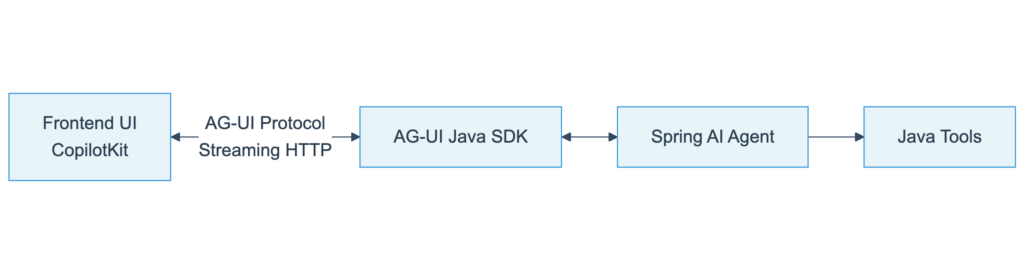
Why does this matter for Java developers? Because UI expectations are rising. An AI that simply returns text is no longer enough. AG-UI provides the protocol to make modern, interactive AI experiences possible, and the Java SDK delivers it in a form that fits naturally into the Spring ecosystem.
Spring AI’s Strength (and Its Blind Spot)
Spring AI has quickly become the go-to solution for Java developers who want to bring LLM capabilities into their backend services. It provides a clean abstraction for prompt templates, model operations, and tool definitions—all using patterns familiar to anyone who has worked with Spring Boot. But Spring AI deliberately stops at the backend layer. It focuses on intelligence and orchestration, not on how those interactions reach the frontend. Modern AI applications require far more than a simple [/chat] endpoint. Users expect agents that stream intermediate reasoning, execute tools dynamically, react to UI events, and present structured outputs in real time. Without a standard communication layer, every team ends up building this themselves: custom WebSocket endpoints, ad-hoc JSON schemas, manual state synchronization, and brittle tool call coordination.
AG-UI fills this gap. It provides a standardized protocol that sits between Spring AI and the frontend, giving Java developers a ready-made communication layer for agent-driven interfaces. Spring AI handles intelligence, AG-UI handles interaction, and your application becomes simpler and more maintainable.
The AG-UI Java SDK: Protocol Made Practical
A protocol is only useful if developers can adopt it easily. That’s why the AG-UI Java SDK was built: to bring AG-UI’s event model and agent lifecycle to the Spring ecosystem in a clean, idiomatic way.
At the foundation is streaming HTTP. AG-UI uses a long-lived HTTP connection to stream events between frontend and backend, avoiding WebSocket complexity while still enabling continuous, event-driven communication. The SDK handles the entire pipeline automatically.
The Java SDK provides three core capabilities:
1. Streaming Event Handling Incoming AG-UI events (user messages, UI commands, context updates) are deserialized into typed Java objects. Outgoing events—agent messages, state updates, tool invocations—stream back via server-sent events.
2. Agent Orchestration The SDK connects events to your agent logic, whether you’re using Spring AI, LangChain4j, or custom engines. It manages sessions, state transitions, and structured responses without glue code.
3. Tool Invocation Tools triggered from UI actions are simple Java classes or Spring components. When an agent emits a tool call, the SDK executes the method and streams results back with proper metadata.
The result: your UI speaks AG-UI, your backend speaks AG-UI, and the SDK ensures both sides stay perfectly aligned.
A Real-World Integration: Setting Up AG-UI with Spring Boot
Let’s walk through an actual implementation. Setting up AG-UI with Spring AI requires three components: an agent configuration, a controller endpoint, and the AG-UI service.
Step 1: Add Dependencies
<dependency>
    <groupId>com.ag-ui.community</groupId>
    <artifactId>spring-ai</artifactId>
    <version>1.0.1</version>
</dependency>
<dependency>
    <groupId>com.ag-ui.community</groupId>
    <artifactId>spring-server</artifactId>
    <version>1.0.1</version>
</dependency>
Step 2: Configure Your Agent
@Configuration
public class AgentConfig {

    @Bean
    public SpringAIAgent chatAgent(ChatModel chatModel) {
        ChatMemory memory = MessageWindowChatMemory.builder()
            .chatMemoryRepository(new InMemoryChatMemoryRepository())
            .maxMessages(10)
            .build();

        return SpringAIAgent.builder()
            .agentId("assistant")
            .chatModel(chatModel)
            .chatMemory(memory)
            .systemMessage("You are a helpful AI assistant.")
            .state(new State())
            .build();
    }
}
Step 3: Create the Endpoint
@Controller
public class AgUiController {

    @Autowired
    private AgUiService agUiService;

    @Autowired
    private SpringAIAgent chatAgent;

    @PostMapping("/agui/chat")
    public ResponseEntity<SseEmitter> chat(@RequestBody AgUiParameters params) {
        SseEmitter emitter = agUiService.runAgent(chatAgent, params);
        return ResponseEntity.ok()
            .cacheControl(CacheControl.noCache())
            .body(emitter);
    }
}
That’s it. Your Spring Boot application now speaks AG-UI natively, streaming agent responses and events to any compatible frontend.
Connecting CopilotKit: The Frontend Side
CopilotKit is a React framework for building AI-powered interfaces that works seamlessly with AG-UI. It provides components for chat, agent state, and tool rendering—all protocol-aware.
Step 1: Install CopilotKit
npm install @copilotkit/react-core @copilotkit/react-uiStep 2: Configure the Provider
import { CopilotKit } from "@copilotkit/react-core";
import { CopilotSidebar } from "@copilotkit/react-ui";

function App() {
  return (
    <CopilotKit runtimeUrl="http://localhost:8080/agui/chat">
      <CopilotSidebar>
        <YourApplication />
      </CopilotSidebar>
    </CopilotKit>
  );
}
Step 3: Use the Chat Interface
import { useCopilotChat } from "@copilotkit/react-core";

function ChatComponent() {
  const { messages, sendMessage } = useCopilotChat();

  return (
    <div>
      {messages.map(msg => (
        <div key={msg.id}>{msg.content}</div>
      ))}
    </div>
  );
}
CopilotKit handles all AG-UI protocol details—parsing streaming events, rendering tool calls, managing state updates. The frontend and Spring Boot backend communicate through the standardized AG-UI protocol, with no custom integration code required.

Adding Tools: Making Agents Actionable
Agents become powerful when they can execute actions. In AG-UI + Spring AI, tools are standard Spring AI ToolCallback instances that the agent can invoke during conversations.
public class WeatherTool implements Function<WeatherRequest, String> {
    @Override
    public String apply(WeatherRequest request) {
        return "Temperature in " + request.location() + " is 22°C";
    }
}

record WeatherRequest(String location) {}
Register with Agent
@Bean
public SpringAIAgent weatherAgent(ChatModel chatModel) {
    ToolCallback weatherTool = FunctionToolCallback.builder(
        "get_weather",
        new WeatherTool()
    )
    .description("Get current weather for a location")
    .inputType(WeatherRequest.class)
    .build();

    return SpringAIAgent.builder()
        .agentId("weather-assistant")
        .chatModel(chatModel)
        .toolCallback(weatherTool)
        .systemMessage("You are a weather assistant.")
        .build();
}
Tool Execution Flow
The AG-UI protocol streams each step to the frontend in real-time, creating transparent, observable AI interactions. CopilotKit automatically renders tool calls in the UI, showing users exactly what the agent is doing.
Shared State: Context That Travels
One of AG-UI’s most powerful features is shared state—a key-value store that travels between frontend and backend with every request. This allows agents to maintain context beyond chat history.
Setting Initial State
@Bean
public SpringAIAgent contextualAgent(ChatModel chatModel) {
    var state = new State();
    state.set("user_timezone", "America/New_York");
    state.set("language", "en");

    return SpringAIAgent.builder()
        .agentId("contextual-agent")
        .chatModel(chatModel)
        .state(state)
        .systemMessage("You are a helpful assistant.")
        .build();
}
Dynamic System Messages
return SpringAIAgent.builder()
    .systemMessageProvider(agent -> {
        String lang = agent.getState().get("language");
        String tz = agent.getState().get("user_timezone");
        return String.format(
            "Respond in %s. User timezone: %s", lang, tz
        );
    })
    .build();
Frontend State Updates
import { useCopilotContext } from "@copilotkit/react-core";

function LanguageSelector() {
  const { setContext } = useCopilotContext();

  const changeLanguage = (lang: string) => {
    setContext({ language: lang });
  };

  return <button onClick={() => changeLanguage('es')}>Spanish</button>;
}
State flows bidirectionally: the frontend updates context, the backend receives it immediately, and the agent adapts its behavior accordingly. This creates truly contextual AI interactions.
Why AG-UI Changes the Game for Java Developers
Before AG-UI, Java developers building AI features faced a fundamental problem: Spring AI stops at the model layer. You got great tools for calling LLMs and defining prompts, but translating those interactions into a responsive UI required custom infrastructure.
AG-UI solves this by providing:
1. A Standard Protocol No more inventing custom message formats or WebSocket conventions. AG-UI defines exactly how agents and UIs communicate, making your backend instantly compatible with any AG-UI frontend like CopilotKit.
2. Zero Boilerplate Streaming Streaming responses, tool calls, and state updates are handled automatically. You focus on agent logic, not plumbing.
3. Framework Flexibility Use Spring AI, LangChain4j, or any other agent framework. AG-UI adapts to your architecture rather than forcing a specific pattern.
4. Production-Ready Features Multi-agent routing, conversation threading, observability events, and error handling come built-in.
For Java teams, this means AI features ship faster, with less code, and with better user experiences. The gap between backend intelligence and frontend interaction finally has a bridge.
Open Source and Community-Driven
AG-UI is fully open source and available under the MIT license. The protocol and all SDK implementations are community-driven projects designed to evolve with the needs of developers building agent-based applications.
The Java SDK and Spring AI integration were developed by Pascal Wilbrink as a community contribution to bring AG-UI to the Java ecosystem, providing Spring Boot developers with first-class support for the protocol.
Important Note: AG-UI is actively under development and subject to change. The protocol and APIs may evolve as the community identifies improvements and new use cases. We recommend following the repository for updates and participating in discussions about the protocol’s direction.
If you’re interested in contributing, have feedback, or want to collaborate on improving the Java SDK or the AG-UI protocol itself, please visit:
GitHub Repository: https://github.com/ag-ui-protocol/ag-ui
The project welcomes contributions—whether it’s improving documentation, adding features, reporting issues, or helping shape the protocol’s future. Join the community and help build the standard for agent-driven user interfaces.
Conclusion
Spring AI brought LLM capabilities to Java developers in a familiar, Spring-native way. But getting those capabilities into production applications required solving a harder problem: how to build interactive, agent-driven user interfaces.
AG-UI provides the missing piece. It’s a protocol-first approach that standardizes the communication layer between AI backends and modern frontends. With the AG-UI Java SDK and frontend frameworks like CopilotKit, Spring Boot developers can now build UI-native AI experiences without reinventing infrastructure for every project.
The result? Faster development, cleaner code, and AI applications that feel as responsive and interactive as users expect.
If you’re building AI features in Java, AG-UI is worth exploring. It might just be the bridge your application needs.
Resources:
- AG-UI Protocol: https://github.com/ag-ui-protocol/ag-ui
- Java SDK: https://github.com/ag-ui-protocol/ag-ui/tree/main/sdks/community/java
- CopilotKit: https://copilotkit.ai
- Example Applications: https://github.com/ag-ui-protocol/ag-ui/tree/main/sdks/community/java/examples

This article is part of the JAVAPRO magazine issue:
From Coder To System Designer
Understand what it means to move from coding to designing systems in the age of AI.
Take a closer look at modern Java platforms, architectural thinking, and the responsibilities that come with shaping complex software systems.
Discover the edition →


