


Your pipeline is green, the app is deployed, and everything looks fine… until production says “nope”. A request fails and the logs show ClassNotFoundException, or worse, NoSuchMethodError. These are among the most confusing runtime errors because the code compiled successfully, but the JVM is acting differently than you would expect.
Let’s dive in and explore how the class loader works, what class shadowing is (when one class silently wins over another on the classpath) and what class shading is (when you deliberately relocate packages so multiple versions can coexist). We’ll also see how these two concepts can help solve mysterious production issues and make your app more stable and secure.
The code used in the examples is available on GitHub: elwin013/class-shading-and-shadowing-examples. The examples uses modern Java (17+) and Maven - it might be worth cloning the repository and experimenting locally with the code to see how it works in practice.
The Class Loader and Classpath
The heart of class loading is the ClassLoader. At runtime, it turns a fully qualified name (FQN, the class name with its corresponding package) such as com.example.Clazz into an actual class that the JVM can execute. Two different packages can safely contain classes with the same simple name, because the package is part of the FQN.
A given ClassLoader defines a class at most once. If the same class is requested again, the loader returns the already-defined Class object instead of re-reading it from disk.
We often say “the class loader”, but in fact the JVM uses multiple class loaders. In a typical application we can distinguish at least three:
- Bootstrap - loads core Java runtime classes (it is implemented in native code, so
getClassLoader()returnsnull). - Platform - loads standard platform modules from the JDK.
- Application - loads your application classes and dependencies from the classpath.
There can be more, for example in application servers there is often an additional class loader per web application. In Tomcat, this is called WebappClassLoader and it is used to isolate each web application.
Because a class is effectively identified by (ClassLoader + FQN), the same FQN can exist more than once in a single JVM if it is loaded by different class loaders. Examples are aforementioned application servers and plugin-based apps.
We can inspect class loaders by calling getClassLoader() on a class, as shown below. We can see that the Instant class is loaded by the bootstrap class loader, because the loader is shown as null.
package net.codeer.example4;

import java.sql.Date;
import java.time.Instant;

public class App {
    public static void main(String[] args) {
        System.out.println("net.codeer.example4.App class loader: " + App.class.getClassLoader());
        System.out.println("java.sql.Date loader: " + Date.class.getClassLoader());
        System.out.println("java.time.Instant class loader: " + Instant.class.getClassLoader());
    }
}
When we run this code, we will see the following output:
net.codeer.example4.App class loader: jdk.internal.loader.ClassLoaders$AppClassLoader@1dbd16a6
java.sql.Date loader: jdk.internal.loader.ClassLoaders$PlatformClassLoader@1d81eb93
java.time.Instant class loader: null
Class Loader Hierarchy
Class loaders are ’lazy’ in the sense that they load classes on demand. By default they follow the parent delegation model and delegate class loading to the parent whenever possible.
When the application wants to load a class like com.example.Foo, the AppClassLoader first checks whether it has already defined that class. If not, it asks its parent (PlatformClassLoader). If the platform loader does not find it, it delegates again to its parent (BootstrapClassLoader).^(1)
If none of the parents can provide it, the AppClassLoader then attempts to load it from the classpath (or from known modules). If it still cannot find it, the JVM throws the infamous ClassNotFoundException.
Even though parent delegation is the default, it can be customized. For example, an application server can use custom class loaders to isolate applications and ensure the expected versions are loaded at runtime.
Class Shadowing and Dependency Hell
So, what is class shadowing? It is similar (as an idea) to variable shadowing - if the same fully qualified class name (FQN) is available in more than one place, one definition “wins” and the other one is effectively ignored. For example, if a JAR on your app classpath contains com.example.Clazz and you also create a class com.example.Clazz in your application, your application class will shadow the version from that other JAR.
Build tools typically resolve version conflicts by selecting a single version of a library for the final runtime classpath. In Maven, version conflict resolution is based on the “nearest wins” rule in the dependency graph; declaration order can matter in some tie cases. If your dependencies require different versions of a common dependency, the chosen version can surprise you and you can end up with “dependency hell”.
Assume the following example - the app uses two modules (example5-module and example5-secondmodule) that both depend on Gson, but in different versions:
example5-moduleuses Gson 2.7.example5-secondmoduleuses Gson 2.10.1, and it uses thedisableJdkUnsafemethod, which is not available in 2.7.
The application code looks like this (excluding imports):
public static void main(String[] args) {
    var helloWorld = new HelloWorlder("Kamil", 2023);

    var serializer = new NormalSerializer(); // from example5-module
    System.out.println(serializer.serialize(helloWorld));
    System.out.println(serializer.getSerializerPackage());

    var serializer2 = new FancySerializer(); // from example5-secondmodule
    System.out.println(serializer2.serialize(helloWorld));
    System.out.println(serializer2.getSerializerPackage());
}
And the dependencies in the pom.xml are defined as follows:
<dependencies>
    <dependency>
        <groupId>net.codeer</groupId>
        <artifactId>example5-module</artifactId>
        <version>1.0-SNAPSHOT</version>
    </dependency>
    <dependency>
        <groupId>net.codeer</groupId>
        <artifactId>example5-secondmodule</artifactId>
        <version>1.0-SNAPSHOT</version>
    </dependency>
</dependencies>
At compile time everything is fine, but FancySerializer expects a newer Gson, while on the classpath the older one is found first. That results in the infamous java.lang.NoSuchMethodError.
We can see which version Maven selected by running mvn dependency:tree^(2):
[INFO] --- dependency:3.7.0:tree (default-cli) @ example5-app ---
[INFO] net.codeer:example5-app:jar:1.0-SNAPSHOT
[INFO] +- net.codeer:example5-module:jar:1.0-SNAPSHOT:compile
[INFO] |  \- com.google.code.gson:gson:jar:2.7:compile
[INFO] \- net.codeer:example5-secondmodule:jar:1.0-SNAPSHOT:compile
Reordering dependencies (so the example5-secondmodule dependency is defined first) may change the resolved version. In that case, the error will not be thrown, because Gson 2.10.1 is loaded:
[INFO] --- dependency:3.7.0:tree (default-cli) @ example5-app ---
[INFO] net.codeer:example5-app:jar:1.0-SNAPSHOT
[INFO] +- net.codeer:example5-secondmodule:jar:1.0-SNAPSHOT:compile
[INFO] |  \- com.google.code.gson:gson:jar:2.10.1:compile
[INFO] \- net.codeer:example5-module:jar:1.0-SNAPSHOT:compile
It is fragile and hard to maintain, though. A more reliable approach is to pin the version explicitly, so the selected Gson version is “set in stone” regardless of transitive dependencies. To do so, we can define it before any other dependencies:
<dependencies>
    <dependency>
        <groupId>com.google.code.gson</groupId>
        <artifactId>gson</artifactId>
        <version>2.10.1</version>
    </dependency>
    <dependency>
        <groupId>net.codeer</groupId>
        <artifactId>example5-module</artifactId>
        <version>1.0-SNAPSHOT</version>
    </dependency>
    <dependency>
        <groupId>net.codeer</groupId>
        <artifactId>example5-secondmodule</artifactId>
        <version>1.0-SNAPSHOT</version>
    </dependency>
</dependencies>
If we run mvn dependency:tree with the above configuration, we will see that the selected Gson version is now 2.10.1:
[INFO] --- dependency:3.7.0:tree (default-cli) @ example5-app ---
[INFO] net.codeer:example5-app:jar:1.0-SNAPSHOT
[INFO] +- com.google.code.gson:gson:jar:2.10.1:compile
[INFO] +- net.codeer:example5-module:jar:1.0-SNAPSHOT:compile
[INFO] \- net.codeer:example5-secondmodule:jar:1.0-SNAPSHOT:compile
That also means we need to determine, often through a trial-and-error approach, which version supports all our dependencies.
Fortunately, there are other mechanisms that we can use as well.
Class Shading and Maven Shade Plugin
Not a silver bullet (a solution to all problems), but one solution is a mechanism called class shading. In general, it means relocating (renaming) packages so class shadowing will not occur. For instance, we can relocate com.google.gson into net.codeer.com.google.gson in the resulting artifact, and then use our “private copy” in the application. It increases the size of the artifact due to additional classes, but it ensures that the expected version is used, eliminating NoSuchMethodError.
While it is easy to move a couple of classes manually, it would be a problem to relocate larger dependencies. To automate the process, we can use the Maven Shade Plugin^(3).
<plugin>
    <groupId>org.apache.maven.plugins</groupId>
    <artifactId>maven-shade-plugin</artifactId>
    <version>3.5.1</version>
    <executions>
        <execution>
            <phase>package</phase>
            <goals>
                <goal>shade</goal>
            </goals>
            <configuration>
                <artifactSet>
                    <includes>
                        <include>com.google.code.gson:gson</include>
                    </includes>
                </artifactSet>
                <relocations>
                    <relocation>
                        <pattern>com.google.gson</pattern>
                        <shadedPattern>net.codeer.com.google.gson</shadedPattern>
                    </relocation>
                </relocations>
            </configuration>
        </execution>
    </executions>
</plugin>
Adding the above configuration to our pom.xml build section will, during the package phase, do the following:
- Include only the
com.google.code.gson:gsondependency, - Copy all classes from the package
com.google.gsonintonet.codeer.com.google.gson, - Rewrite references in the compiled bytecode to use
net.codeer.com.google.gson.
Unfortunately, IDE support for shading (and maven-shade-plugin) is not perfect. Because relocation happens at build time, the IDE still works with the original packages. This is usually fine, but it can make debugging and navigating stack traces harder.
Practical Use Cases
The most straightforward use case is the need to change how the code works, even for basic tasks like adding extra logging, which can be useful for debugging issues in production systems. We can also add or extend features, or even backport some from newer versions.
A more interesting case is altering classes to allow mocking (or proxying) them, which can be as simple as copying the class and removing final from the class definition. Be careful, though - copying classes can hide the fact that you are diverging from upstream, so it should be treated as a quick fix, not a long-term strategy.
Another practical use case is the ability to fix bugs without waiting for an upstream release. Assume we have identified a bug in a library that affects our application. We prepared a fix, sent it to the maintainers, and are waiting for a new version of the library. We do not have to wait to unblock ourselves - we can copy the part of the code that causes the issue into our codebase, apply the fix, and thanks to shadowing, apply the patch at runtime. After the new version is released, we can update to it and remove our copy.
Using shading, we can also minimise conflicts (and dependency hell) in libraries. Some dependencies, such as Apache Commons, are used almost everywhere. There is a chance that we also want to use them in our library. We can use shading to copy that library into our package with package relocation, so our library will use the selected version that will not be overridden by the consuming application. As an example, we can look at the io.trino:trino-jdbc library^(4), where maintainers decided to shade multiple libraries, including Guava:
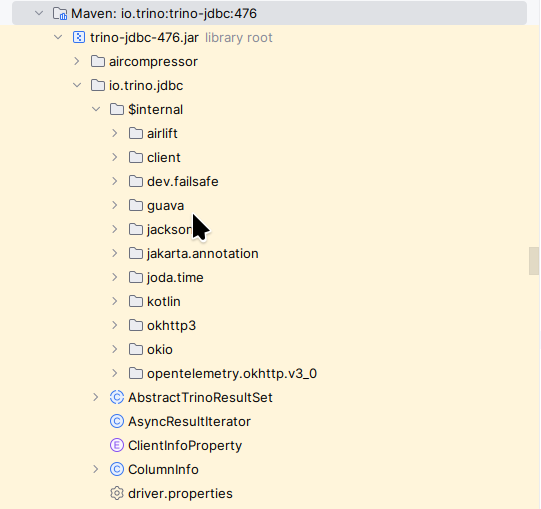
It will increase the size of our library, so it should be done carefully. We should not shade everything. In an ideal situation (without dependency hell), we want to have exactly one version of any class on our classpath, shared by multiple dependencies, and not causing issues for any of them.
Legal Considerations
I am not a lawyer, so this is not legal advice. Interpretations of licenses may vary between jurisdictions.
One might ask: is it legal to use shading and shadowing? The answer is always “it depends”. As you might guess, everything depends on the license of the code we want to use.
If the library we want to shade or shadow is licensed under MIT, Apache, BSD, or another permissive license, these techniques are typically allowed - as long as you follow the license terms, such as keeping notices.
The GPL with the Classpath Exception is worth noting, as it explicitly mentions the “classpath”. If we copy code from such a library into our codebase (for example, to shadow a class), that copied code may become part of our program rather than just something we link to. Therefore, it can be worthwhile to keep such changes in a separate module, and ensure any modifications comply with the license.
While licensing is one side of the coin, the other side is helping other people. If we find a bug and fix it locally by shadowing a class, it is worth (and good!) to provide the patch upstream - by sending it to maintainers or opening a pull/merge request on GitLab or GitHub.
Summary
That is all. Class loading issues stop feeling mysterious once you remember two rules: class loaders load classes lazily, and the JVM identifies a class by the pair: class loader and fully qualified name (FQN).
With that in mind, the two concepts we discussed fall into place. Shadowing happens when the same class appears in more than one place and the classpath order decides which version wins, which can lead to runtime surprises. Shading is the build-time fix: it relocates packages so your dependency becomes an isolated copy and avoids accidental clashes with other versions on the classpath.
Used thoughtfully, these ideas help you debug production issues, explain “it works on my machine” failures, and ship more robust libraries. The trade-offs are real: larger artifacts, trickier debugging, extra build complexity, and licensing responsibilities when you bundle and redistribute code.

This article is part of the JAVAPRO magazine issue:
From Coder To System Designer
Understand what it means to move from coding to designing systems in the age of AI.
Take a closer look at modern Java platforms, architectural thinking, and the responsibilities that come with shaping complex software systems.
Discover the edition →


